 Music Teacher Desk
A place for every student
Keep instruments, lesson rates, billing plans, and enrollment status together.
A little structure. A lot more headspace.
Smart tools for independent music teachers.
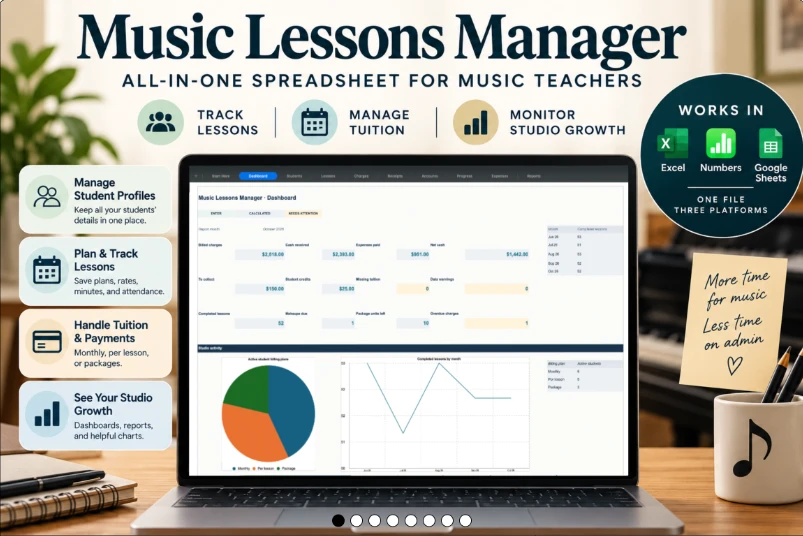
Meet Music Lessons Manager: one organized spreadsheet for your students, lessons, tuition, and teaching progress.
One-time purchase · Digital download · No template subscription
A real look inside
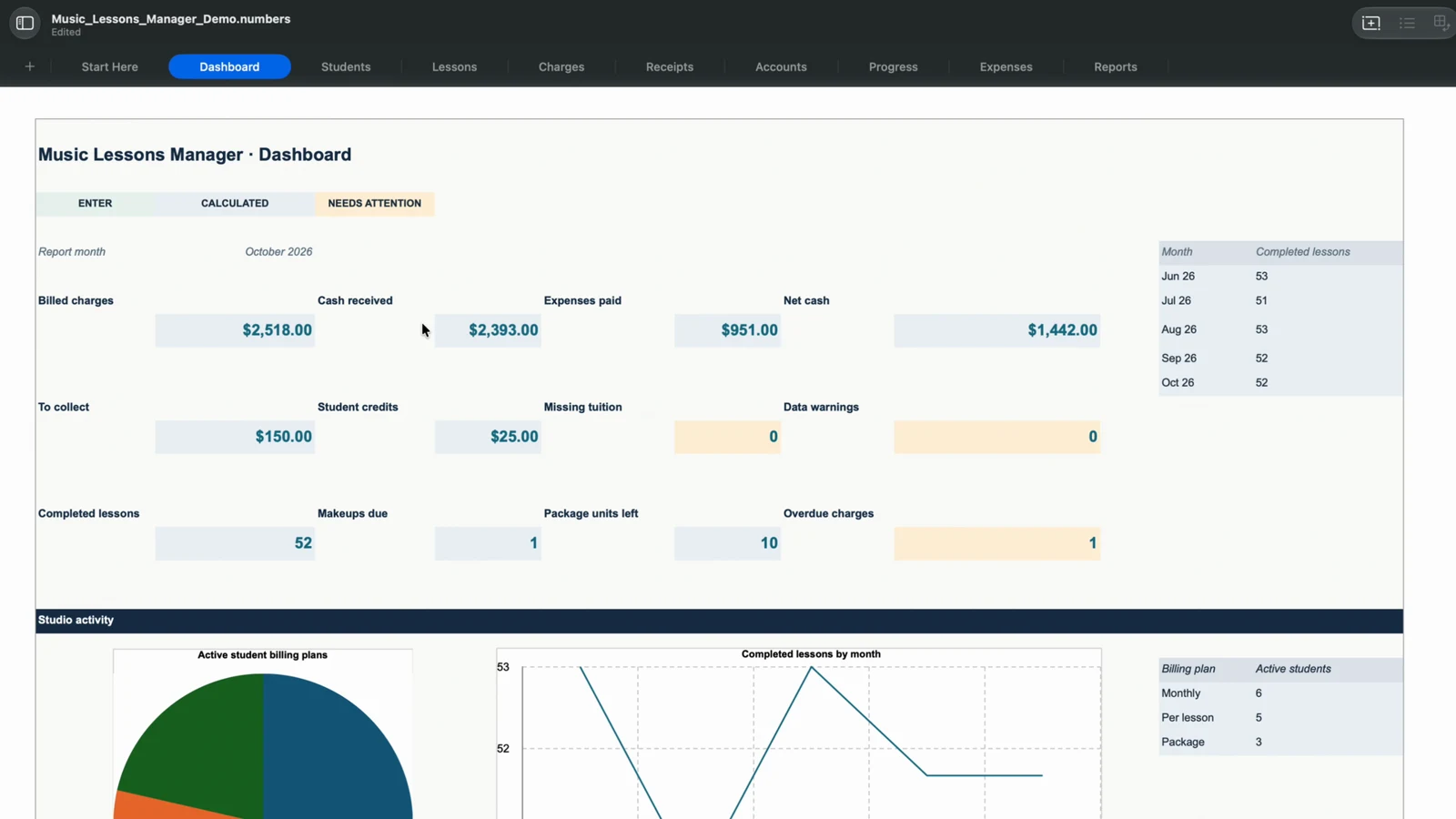
Start with the dashboard. Then go deeper into the students, lessons, and payments behind the numbers.
Keep instruments, lesson rates, billing plans, and enrollment status together.
Record attendance, cancellations, completed lessons, and eligible makeup credits.
Track monthly tuition, per-lesson fees, packages, receipts, balances, and credits.
Review cash received, expenses, learning goals, and monthly activity in one workbook.
15 seconds at the desk
A short tour of the actual Numbers workbook, from student records to monthly reports.
Silent video with on-screen labels. Fictional sample data.
The tour opens on the dashboard, showing billed charges, cash received, expenses, balances, and lesson activity. It moves through Students, Lessons, Accounts, Progress, and Reports, then returns to the dashboard. The examples use fictional records. Clean and Demo versions are included for Excel and Numbers; Google Sheets imports the Excel file.
Use the tools you know
Open the included .xlsx workbook.
✓ Tested in Excel webUse the included native .numbers version.
✓ Tested in Numbers desktopImport the included Excel workbook.
✓ Tested in Google Sheets webCore workflows checked October 27, 2026: balances, payment entry, packages, credits, report months, and data warnings. Formatting may vary by app. Your spreadsheet application or account is separate from this purchase.
Your next organized chapter
Explore the Demo to see how the pieces fit together. Then make a copy of the Clean workbook and make it yours.
Before you buy
Clear expectations make for a better start.
Setup and manual data entry are required. No automatic invoicing, payment collection, tax calculations, or calendar synchronization. Digital files only.
It is a downloadable spreadsheet template. You open it in Microsoft Excel, Apple Numbers, or Google Sheets. It is not standalone software or a hosted student portal.
Yes. Import the included Excel (.xlsx) workbook into Google Sheets. Core workflows were tested in Excel web, Google Sheets web, and Numbers desktop on October 27, 2026. Layout can vary between applications; these checks are not a guarantee for every future version or input.
Clean and populated Demo workbooks in Excel and native Apple Numbers formats, plus Quick Start PDF guides. Google Sheets uses an import of the Excel workbook. The Demo contains fictional sample records; start your own records in a copy of the Clean workbook.
Music Lessons Manager is a one-time $19 USD purchase, with no recurring subscription for the template. Access to your chosen spreadsheet application is separate. Any applicable checkout taxes and currency conversion are shown by Gumroad.
No. It records the payments and charges you enter. It does not automatically send invoices, collect payments, calculate taxes, or synchronize calendars.
Purchase through Gumroad using the buy button. Gumroad handles payment and digital delivery. No physical item is shipped. Keep your receipt and a backup of your files.
This website works on mobile. For setting up and working in the detailed workbook, a desktop or laptop is recommended. Workbook usability depends on your spreadsheet application and screen size.
Email support@musicteacherdesk.com with your order details, but do not send student records. Review the current purchase and refund terms on Gumroad before buying; this website does not add a separate refund promise.
From the teacher’s desk
Keep charges, receipts, and balances clear without mixing up money billed and money received.
Read the guide →Lessons & attendanceBuild a consistent record of completed lessons, cancellations, and makeup credits.
Read the guide →Students & organizationCreate a manageable home for student details, lesson notes, and progress.
Read the guide →Make room for what you love
Questions? Let’s talk.